
How to Build Professional Agents in a Private Environment with Gemini Enterprise, ADK, and MCP
Building AI agents is no longer just about writing a good prompt. In professional environments, an agent must be able to reason, delegate tasks, call external tools, maintain clear conversation flows, and operate inside a private and controlled environment.
In this article, I share a practical demo of how we built a professional agent in Gemini Enterprise using Google ADK, specialized sub-agents, and MCP tools. The goal of the demo was to simulate a ticket resale agent for the 2026 FIFA World Cup, capable of answering user questions, checking availability, comparing prices, generating payment links, and handling support requests.
This project was created for educational purposes. The MCP endpoint used in the demo is a test endpoint and depends on auxiliary services, such as a crawler and simulated tools, to demonstrate how external data can be connected to a conversational agent.
The Demo Concept
The use case was to build an agent called WC26 Tickets, designed to assist users interested in World Cup 2026 matches.
The main agent does not try to solve everything by itself. Its role is to greet the user, understand the user’s intent, and route the conversation to the correct sub-agent.
The architecture was divided into four specialized profiles:
- Information agent: answers questions about matches, stadiums, host cities, weather, fan zones, logistics, and general World Cup information.
- Booking or sales agent: searches for available tickets, compares prices across platforms, and prepares a reservation.
- Payment agent: generates payment links, checks purchased tickets, issues digital tickets, and sends confirmations by email.
- Support agent: handles issues, refund requests, complaints, and cases where the user needs additional help.
This separation allows each agent to have a clear responsibility. Instead of creating one large prompt that tries to handle everything, we designed a modular system where each sub-agent has its own instructions, tools, and business rules.
Step 1: Creating the Agent in Gemini Enterprise
The first step was to use Gemini Enterprise as a private environment to design and test the agent.
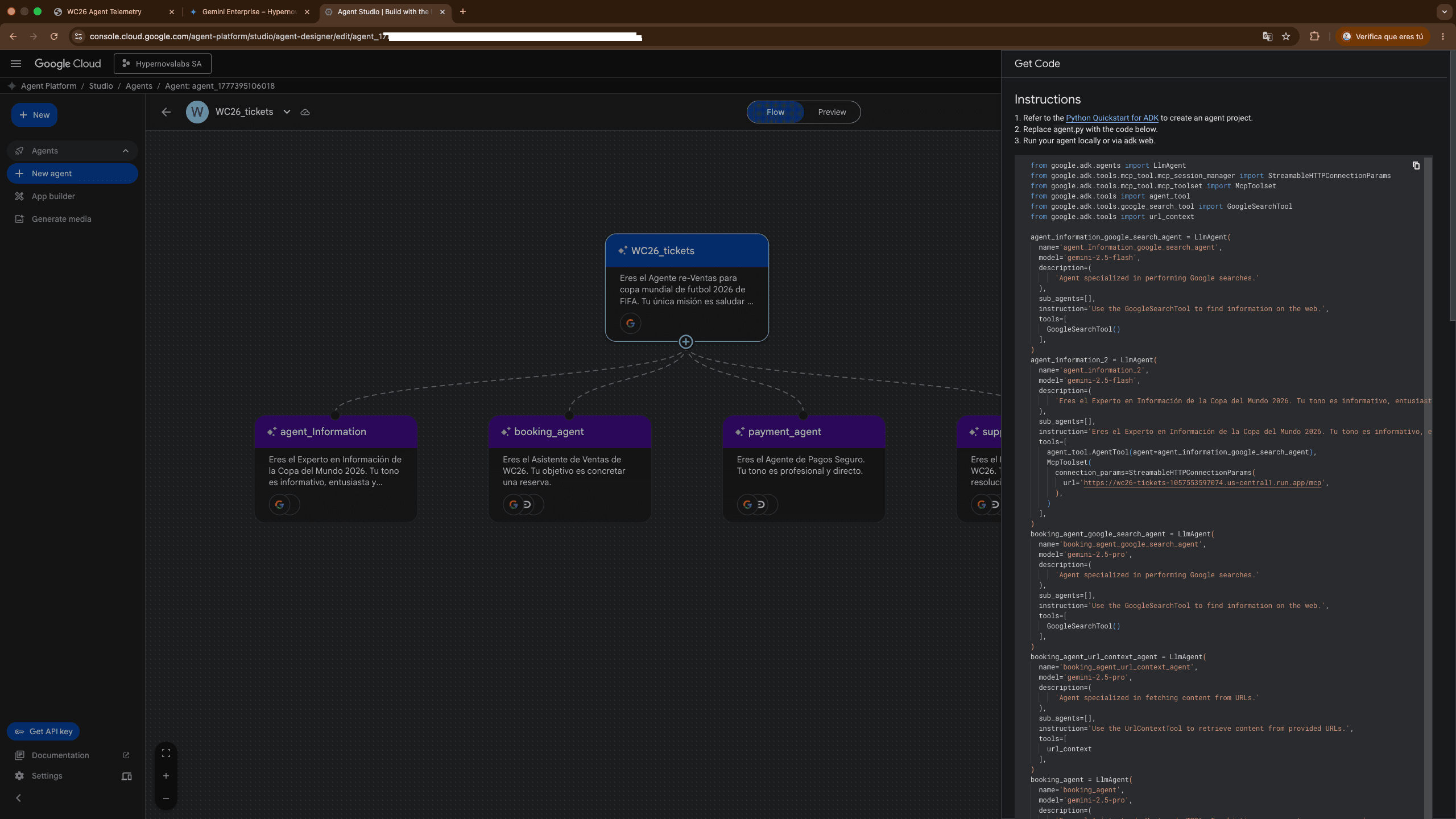
From the interface, we created a new agent called WC26 Tickets. In the visual design view, we can see a flow where the root agent is connected to several sub-agents. This visual representation is important because it helps us understand how responsibilities are distributed across the system.
The root agent acts as the orchestrator. It does not search for tickets, process payments, or resolve refunds directly. Its job is to classify the user’s intent and send the conversation to the right agent.
For example:
- If the user asks, “When does Mexico play?”, the flow goes to the information agent.
- If the user asks, “How much are tickets for Mexico vs Brazil?”, the flow goes to the booking agent.
- If the user says, “I want to pay,” the flow goes to the payment agent.
- If the user says, “I want a refund,” the flow goes to the support agent.
This pattern is essential for professional agents: orchestration should be separated from specialized execution.
Step 2: Using Google ADK to Define the Architecture
After designing the visual flow, we used code with Google ADK to represent the agent architecture.
The project starts with imports like these:
from google.adk.agents import LlmAgent
from google.adk.tools.mcp_tool.mcp_session_manager import StreamableHTTPConnectionParams
from google.adk.tools.mcp_tool.mcp_toolset import McpToolset
from google.adk.tools.google_search_tool import GoogleSearchTool
from google.adk.tools import url_context
These imports allow us to create Gemini-based agents, connect search tools, use URL context, and consume external tools through MCP.
We also define the MCP endpoint:
MCP_URL = 'https://wc26-tickets-1057553597074.us-central1.run.app/mcp'In this demo, the endpoint represents a tool server for querying matches, stadiums, ticket availability, payments, and support operations. It is important to clarify that this is a test MCP endpoint, designed to explain the integration pattern.
In a real system, this endpoint would connect to internal APIs, databases, CRMs, payment systems, inventory services, or authorized platforms.
Step 3: Creating Specialized Sub-Agents
The next step was to define sub-agents with specific roles.
Each sub-agent is created as an LlmAgent, specifying:
- Internal name.
- Model.
- Description.
- Instructions.
- Available tools.
- Sub-agents, if applicable.
For example, the information agent is defined with a very specific role: answering questions about the 2026 World Cup and using MCP tools to query matches or venues.
agent_information_2 = LlmAgent(
  name='agent_information_2',
  model='gemini-2.5-flash',
  description='You are the 2026 World Cup Information Expert.',
  instruction="""You are the 2026 World Cup Information Expert...""",
  tools=[
    GoogleSearchTool(),
    McpToolset(
      connection_params=StreamableHTTPConnectionParams(url=MCP_URL),
    )
  ],
)
The advantage of this design is that the agent does not rely only on general model knowledge. It can use external tools to answer with more structured and reliable information.
In this case, the information agent has access to tools such as:
get-matches: query World Cup matches.get-venues: query stadiums and host venues.GoogleSearchTool: search for information that is not available through MCP.
This creates a useful combination: the agent can query private or structured data through MCP, and complement it with web search when the information is not available in the internal tools.
Step 4: Designing Transitions Between Agents
A central part of the demo was explaining how transitions between agents work.
The root agent includes routing rules. These rules are not decorative; they are operational instructions that tell the system when to delegate.
The main agent was defined like this:
root_agent = LlmAgent(
  name='WC26_tickets',
  model='gemini-2.5-flash',
  description='You are the resale agent for the 2026 FIFA World Cup.',
  sub_agents=[agent_information_2, booking_agent, payment_agent, support_agent],
  instruction="""You are the resale agent for the 2026 FIFA World Cup...

Routing Rules:
If the user asks for general information: call agent_information_2.
If the user wants to buy, check prices, or see availability: call booking_agent.
If the user has a problem, refund request, or complaint: call support_agent.
""",
  tools=[
    GoogleSearchTool()
  ],
)
This pattern is very useful for building professional agents because it allows us to separate business flows.
The user does not necessarily see all the internal complexity. For the user, the experience feels like a natural conversation. Behind the scenes, however, the system decides which agent should handle each moment.
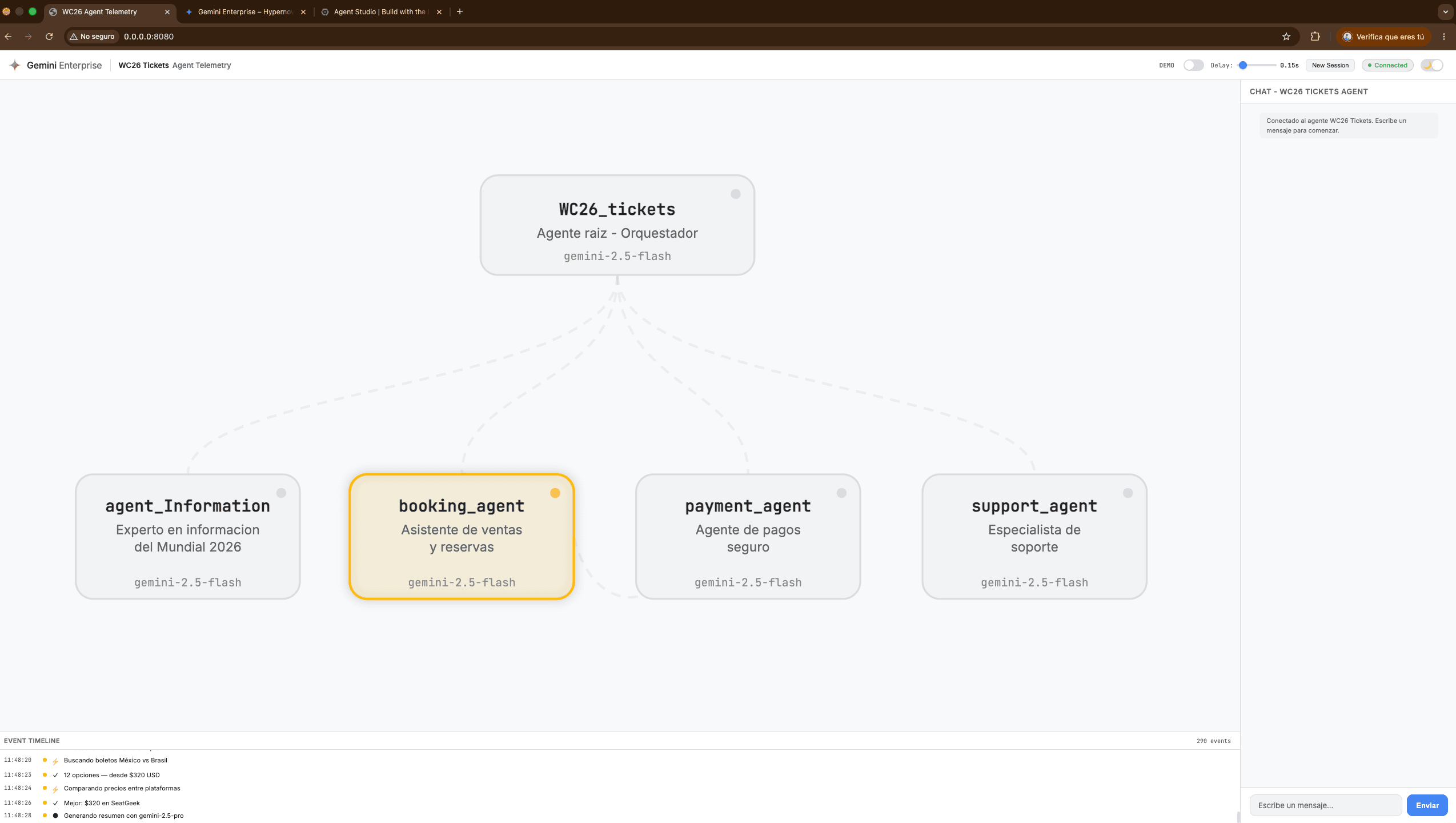
In the telemetry view of the demo, we can observe how the root agent is connected to the sub-agents and how one of them is activated based on the user’s intent. For example, when the user looks for tickets, the flow activates the booking_agent.
Step 5: Connecting Tools with MCP
MCP, or Model Context Protocol, allows an agent to use external tools in a structured way.
In this demo, all the main sub-agents connect to the same MCP endpoint:
McpToolset(
  connection_params=StreamableHTTPConnectionParams(url=MCP_URL),
)
This allows each agent to access tools according to its function.
The booking agent uses tools such as:
get-matchesget-venuessearch-ticketscompare-pricesbuy-ticket
The payment agent uses:
generate-payment-linkget-my-ticketsissue-digital-ticketsend-ticket-emailsend-payment-link
The support agent uses:
check-refund-policyrefund-ticket
The educational idea here is to show that a professional agent should not invent critical operations. If it needs to check availability, it should call a tool. If it needs to generate a payment link, it should call a tool. If it needs to verify a refund policy, it should query the corresponding system.
This reduces errors, improves traceability, and makes it possible to integrate the agent with real services.
Step 6: Defining Critical Rules to Avoid Weak Conversations
One important part of the project was writing precise instructions.
For example, in the booking agent we included a critical rule:
When the user mentions a match, team, or country, immediately use the search-tickets tool to search for available tickets. Do not ask for additional details before searching.
This rule greatly improves the user experience. In many poorly designed agents, the system asks too many questions before taking action.
In this demo, if the user says, “I want tickets for Mexico vs Brazil,” the agent should not first ask how many tickets the user wants. It should search for availability, show real options, and then ask for quantity or category if needed.
We also included a rule to avoid changing prices:
Look at the real prices and do not modify them.
This type of instruction is essential when an agent works with inventory, payments, or pricing. The model should not improvise amounts. It must respect the data returned by the tools.
Step 7: Simulating a Complete Purchase Flow
The purchase flow designed in the demo works as follows:
- The user asks about a match or team.
- The root agent detects commercial intent.
- The conversation is routed to the
booking_agent. - The agent uses
search-tickets. - It presents options with prices and categories.
- If the user confirms quantity and category, it calculates the total.
- It presents a reservation summary.
- If the user confirms, it transfers the summary to the
payment_agent. - The payment agent generates a checkout link.
- The user receives the link to complete the payment.
The summary before payment should include a message like:
I have availability for [Match]. The total for [Quantity] tickets is [Price] and the selected category is [Category]. Do you confirm the reservation?
A key disclaimer is also added:
The price may change. I can only hold it for 20 minutes.
This detail is important to simulate realistic behavior in markets where prices can change constantly.
Step 8: Adding Support and Refunds
A professional agent does not stop at the sale. It also needs to consider support.
That is why we created a support_agent specialized in issues, complaints, and refunds.
This agent has rules such as:
- Always request the Order ID.
- Verify the match date.
- Check the refund policy.
- Do not offer a refund if the event is less than 48 hours away.
- Escalate to a human if the user is frustrated or the issue is complex.
This allows us to model a post-purchase support flow, which in real scenarios is just as important as conversion.
Step 9: Testing the Agent in Gemini Enterprise
After defining the agent, we tested it inside Gemini Enterprise.
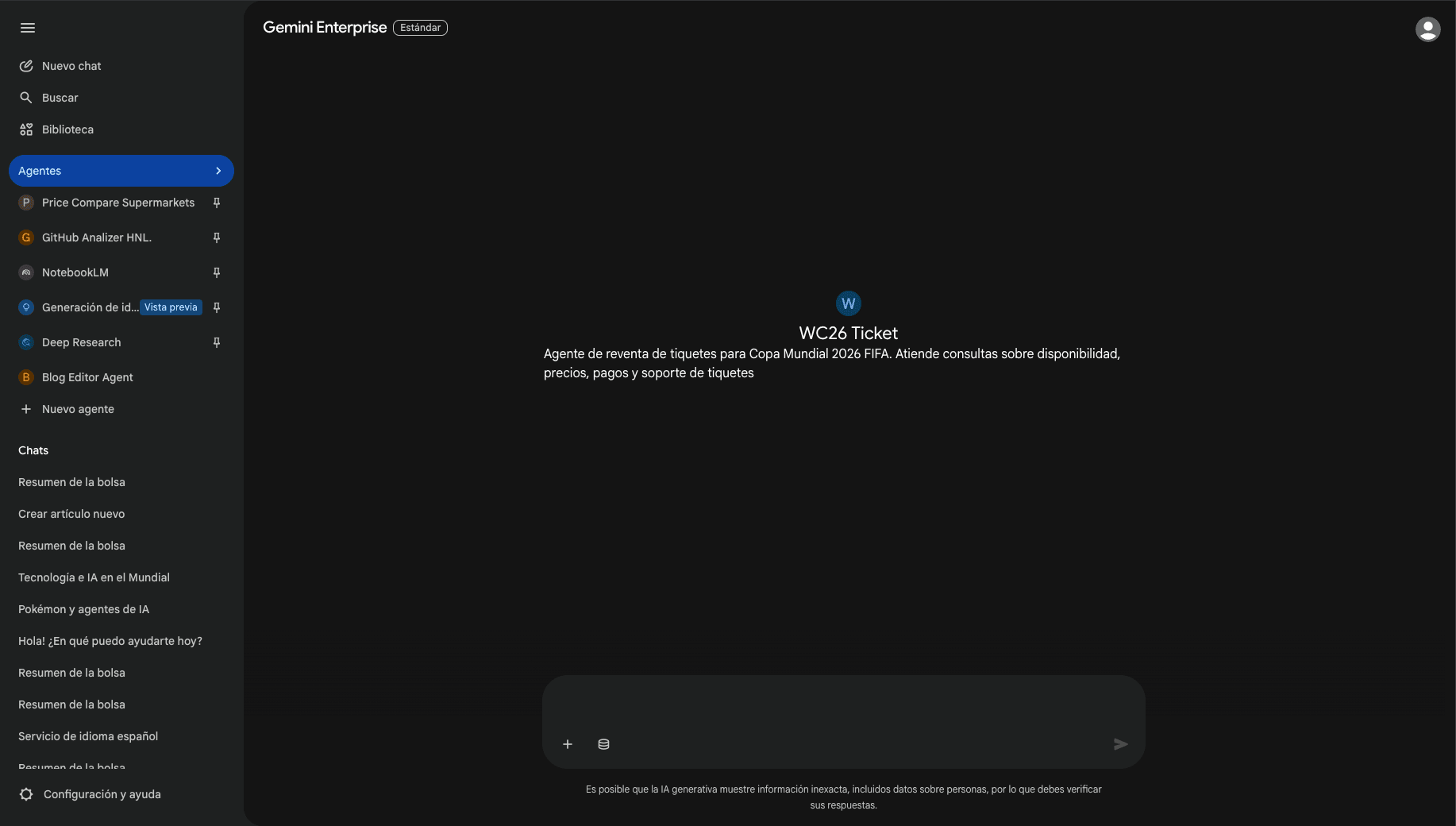
In the interface, the WC26 Ticket agent appears as a private conversational experience. From there, we can talk to the agent, validate its responses, test transitions, and review whether the routing works correctly.
We also used a local telemetry view to observe the behavior of the system. In that view, we can see:
- The root agent.
- The connected sub-agents.
- Which agent is activated during an interaction.
- The event timeline.
- The calls or actions performed during the conversation.
This telemetry is key for debugging agents. It is not enough to look only at the final answer. In professional environments, we need to understand what happened behind the scenes: which agent responded, which tool was used, what data came back, and why a specific decision was made.
What We Learned from the Demo
1. A Good Agent Needs Architecture, Not Just Prompts
Prompts are still important, but they are not enough. An enterprise agent needs roles, tools, rules, transitions, and clear boundaries.
2. Sub-Agents Help Reduce Complexity
Separating information, sales, payments, and support makes instructions cleaner and easier to debug.
3. MCP Connects the Agent with External Systems
The agent can query data, execute operations, and work with services outside the model. This is essential for real business use cases.
4. Telemetry Is Part of Development
Seeing which agent is activated and which tool is called makes it much easier to improve the system.
5. Privacy Matters
Gemini Enterprise allows us to work in a controlled environment to design agents that can connect to private systems, internal tools, or enterprise services.
Important Considerations
This demo does not represent a final commercial ticket sales system. It is an educational proof of concept designed to explain agent patterns, transitions, MCP tools, and orchestration.
The MCP endpoint used in the demo is experimental and depends on test data, simulated tools, and processes such as crawlers. In production, additional validations would be required, including security, authentication, permissions, monitoring, error handling, auditing, and legal compliance.
It would also be important to connect official sources and authorized providers, especially in a sensitive use case such as ticket sales or ticket resale.
Conclusion
Building professional agents with Gemini Enterprise requires thinking beyond a single conversation. It requires designing an architecture.
In this demo, we built a root agent capable of routing the user to specialized sub-agents: information, booking, payments, and support. Each sub-agent has clear instructions and specific tools connected through MCP.
The result is a more organized, traceable, and business-oriented conversational experience.
The main lesson is that professional agents are not built only with the intelligence of the model. They are built by combining models, tools, data, business rules, telemetry, and a well-defined architecture.
Project Repo: Demo Agents